How it works
A Habarico application has two halves that only ever talk through schemas and REST calls.
- A backend library (Python or Ruby) defines resources via admin classes or a DSL and exposes a schema endpoint next to the usual CRUD endpoints.
- The frontend library fetches those schemas and renders the list, show, create, edit and action views from them — fields, inputs, filters, layout containers (boxes), menu entries and action buttons included.
The schema endpoints
Schemas are served at four levels of detail, so the frontend only downloads what a screen needs:
| Endpoint | Returns |
|---|---|
/{api_prefix}/{service_name}/admin/schema/ | Every resource of the service with its views, actions and menu — enough to build the navigation |
/{api_prefix}/{service_name}/admin/{resource_name}/schema/ | The views and actions available on the resource collection, in full detail |
/{api_prefix}/{service_name}/admin/{resource_name}/{record_pk}/schema/ | The views and actions available on a single record, in full detail |
/{api_prefix}/{service_name}/admin/{resource_name}/{record_pk}/{action_name}/schema/ | The form one action needs on that record |
The service-level schema is the entry point: it is fetched once, drives the menu and tells the frontend which resources exist. Detail schemas are fetched per screen, which is what makes per-record permissions and record-dependent forms possible.
Every endpoint is described in the API reference.
What a schema contains
A resource schema describes, in backend terms:
- fields — name, type, label, validation and formatting of every field the resource exposes
- views — which of list / show / create / edit exist, and how their contents are laid out
- actions — the operations offered beyond CRUD, with the form schema each one needs
- menu — where the resource appears in the navigation, with its label and icon
- permissions — whether the current user may read, create, update or delete
The frontend maps each field type to a component. When a type has no built-in component, or the built-in one does not fit, you register your own — the schema stays unchanged.
Request flow
Browser                          Frontend                      Backend
   |                                 |                             |
   |-- opens /admin --------------->|                             |
   |                                 |-- GET /admin/schema ------->|
   |                                 |<-- resources, menu ---------|
   |<-- navigation rendered ---------|                             |
   |                                 |                             |
   |-- opens a resource list ------->|                             |
   |                                 |-- GET /admin/{res}/schema ->|
   |                                 |-- GET /admin/{res} -------->|
   |                                 |<-- schema + records --------|
   |<-- list rendered ---------------|                             |
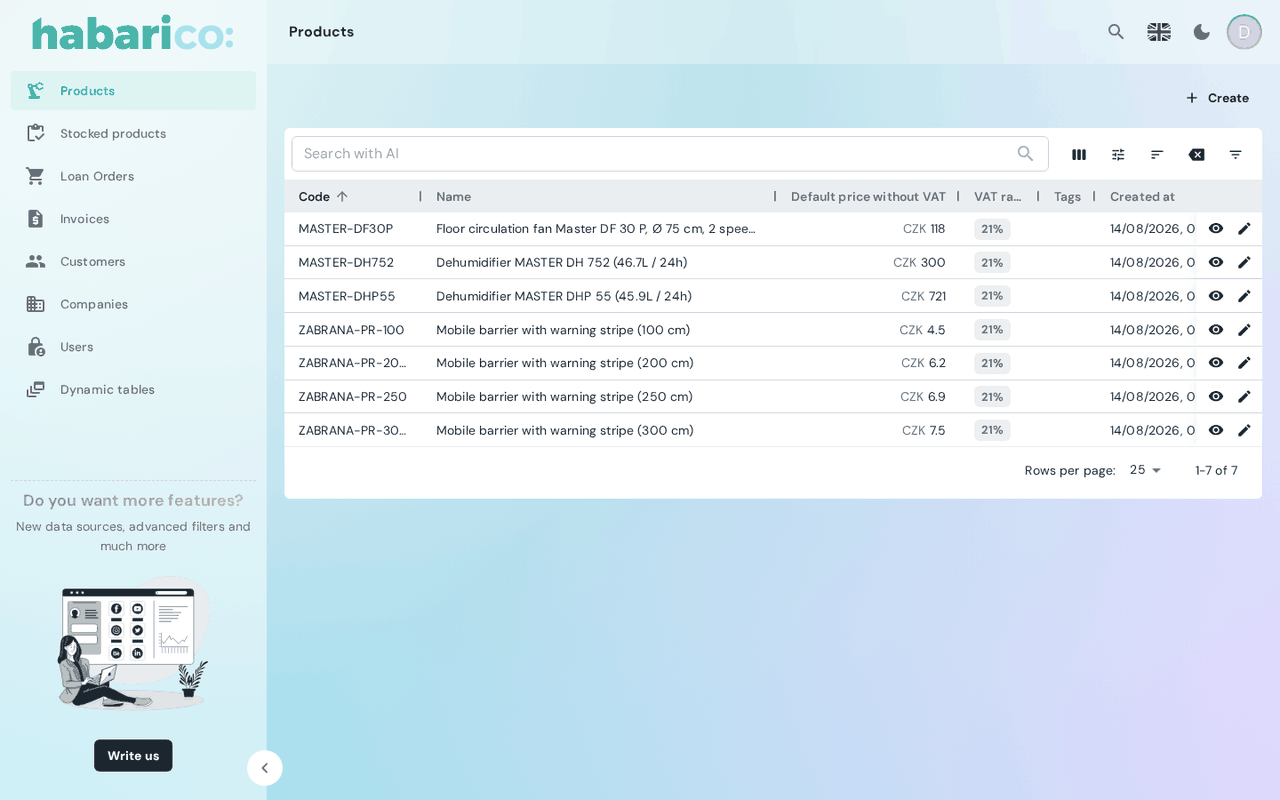
This is what the flow above produces — a list view nobody wrote: columns, filters, sorting, pagination and row actions all come from the resource schema.
snake_case on the wire, camelCase in the components
Both backends emit the schema in snake_case, exactly as the
OpenAPI contract describes it — text_align, dynamic_render, icons_key. The frontend
converts every key to camelCase as it receives the schema, which is why the same option reads as
options.textAlign in the TypeScript types and as text_align in a
backend snippet. A handful of keys are exempt, because they carry user data rather than schema
keys, and keep their contents untouched: defaultFilters, sortForFilters and extraFilters
everywhere, plus parameters, defaultValue and data in a resource schema.
Because both backends emit the same schema shape, the same frontend build works against a Django service and a Rails service alike — and a service can be migrated from one to the other without touching the admin UI. What differs is the feature set, not the shape — see Python and Ruby parity.
One subsystem is the exception: the AI integration exists only in the Python library, so an admin using it is not backend-interchangeable. See Python and Ruby parity for the full split, including the paid features and where the two enum lists still differ.